

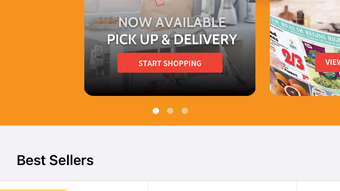
Description
Al's Supermarkets App for iPhone
Overview
The Al's Supermarkets App is a dedicated mobile solution designed to simplify grocery shopping for iPhone users. Developed by Lakeshore Foods Corp, the app enables customers to order groceries for same-day home delivery or curbside pickup at their preferred Al’s store location. It addresses common pain points such as forgotten items, time-consuming in-store trips, and difficulty tracking promotions by offering a streamlined digital shopping experience.
Target users include busy individuals, families, and professionals who value convenience and efficiency. The app is particularly useful for those who want to avoid crowded stores or prefer to shop on their own schedule. Real-world usage scenarios include planning weekly meals, responding to in-store deals via the weekly ad, and managing recurring shopping lists without manual effort.
The developer did not provide additional background beyond the company name. Platform compatibility is limited to iOS devices. No broader system requirements were specified.
Key Features & Capabilities
- Same-Day Delivery & Curbside Pickup – Users can select delivery or pickup options based on availability at their local Al’s store, allowing flexibility in how groceries are received.
- Custom Shopping Lists – The app allows users to create and save personalized lists, helping prevent missed items and supporting repeat orders.
- Weekly Ad Integration – A direct link to the current weekly advertisement enables users to browse promotional items and add them to their order instantly.
- Personal Shopper Service – Orders are curated by trained personal shoppers who follow user preferences and may contact customers for clarification.
- Consistent In-Store Pricing – All online prices match those available in physical stores, ensuring transparency and no hidden costs.
These features support efficient shopping workflows, especially for users managing multiple household needs. For example, a parent can create a list for school lunches and use the weekly ad to stock up on discounted snacks. The integration of personal shoppers adds a human touch, improving order accuracy and customer satisfaction.
User Interface, Workflow & Performance
The app features a clean, intuitive interface optimized for iOS devices. Navigation is straightforward, with clearly labeled sections for browsing, shopping, managing lists, and tracking orders. The layout supports touch-based interactions, making it easy to scroll through product categories and add items with minimal taps.
Workflow efficiency is enhanced by the ability to save favorite items and reorder them quickly. The process from selecting items to placing an order is well-structured, minimizing steps and reducing the chance of errors. Users can view their order history and manage past purchases with ease.
Performance observations are based on general software behavior patterns. The developer did not specify resource usage details. No reports on CPU or RAM consumption were provided. Stability during high-traffic periods or extended usage was not documented.
Compatibility & System Requirements
The Al's Supermarkets App is designed for iOS devices. It supports the latest versions of the operating system as of its release date. The app has a file size of 148.4 MB, which is typical for feature-rich mobile applications with media content and interactive elements.
Exact system requirements were not listed. Compatibility information was partially provided. Users should ensure their device meets standard iOS requirements for app installation. The developer did not specify minimum processor speed, memory, or storage needs beyond the total file size.
Pros and Cons
Pros
- Free to download and use with no subscription fees
- Seamless integration of weekly ads for deal-focused shopping
- Personal shopper service enhances order accuracy and trust
- Custom lists help maintain consistency across shopping trips
- Same-day delivery and curbside pickup options improve convenience
Cons
- Available only on iOS, limiting access for Android users
- No information on offline functionality or data usage
- App size may be large for users with limited device storage
- Dependence on local store availability for delivery and pickup
- Personal shopper communication may introduce delays in order confirmation
FAQ Section
Is the Al's Supermarkets App free to download?
Yes, the app is available at no cost. There are no subscription fees or hidden charges for using its core features.
Can I use the app without an internet connection?
The developer did not specify offline capabilities. The app likely requires an active internet connection for browsing, ordering, and real-time updates.
How often are the weekly ads updated?
Weekly ads are updated regularly to reflect new promotions. The exact update schedule was not provided.
Is my personal shopper available for immediate contact?
Personal shoppers may reach out if clarification is needed. The timing of their communication depends on order volume and store operations.
What happens if an item is unavailable during my order?
If a requested item is out of stock, the personal shopper may substitute it with a similar product, but the final decision is subject to store availability and user preferences.
Final Thoughts + CTA
The Al's Supermarkets App delivers a practical, user-focused solution for grocery shopping on iOS. Its integration of personalized lists, weekly ads, and a personal shopper service sets it apart from basic online ordering tools. While its exclusive iOS availability and lack of offline support are notable limitations, the app’s core functionality remains strong and reliable.
It is ideal for iPhone users who prioritize convenience, time savings, and access to in-store deals. Families, busy professionals, and individuals seeking a hassle-free shopping experience will benefit most from its features.
Download Al's Supermarkets App now and transform your grocery routine with smarter, faster, and more personalized shopping.
Guides & Tutorials for Als Supermarkets
How to install Als Supermarkets
- Click the Preview / Download button above.
- Once redirected, accept the terms and click Install.
- Wait for the Als Supermarkets download to finish on your device.
How to use Als Supermarkets
This software is primarily used for its core features described above. Open the app after installation to explore its capabilities.
User Reviews for Als Supermarkets 0
No reviews found





